Run a batch pipeline on a schedule
What you will learn
Add a recurring schedule to the ingest-to-mart pipeline and see why running it every day does not corrupt the result.
So far you have started weather_daily_pipeline yourself with Run now. For a subject like weather readings, where new data arrives every day, saving a schedule is the right move.
This lesson sets a recurring schedule and shows why running it daily does not duplicate data.
Before you start
The pipeline must be saved and its last run successful. Confirm you can see:
- the pipeline state,
- run history as a strip of bars,
- the settings icon,
- the Run now button.
Set a recurring schedule
- Select the Pipeline settings icon at the top of the pipeline.
- Open the Schedule tab.
- Turn on Enable schedule.
- Choose Daily and set a run time that does not collide with other work.
- Review the generated schedule summary and select Save.
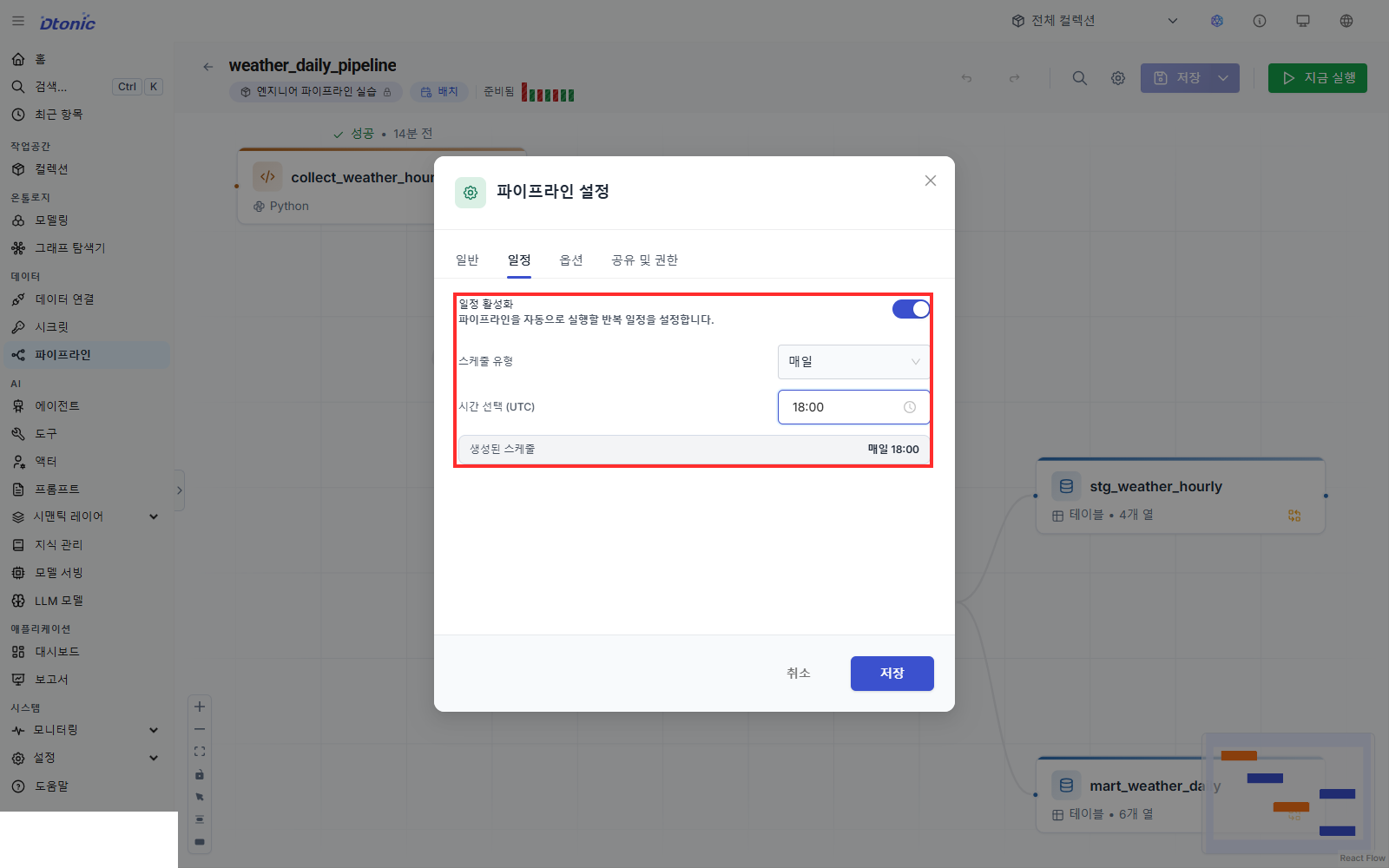
The schedule editor offers per-minute, hourly, daily, weekly, and monthly presets. The saved value is managed as a five-field cron expression.
A pipeline that already carries an RRULE schedule from an import or the API may show RRule schedule at the top. Saving a new preset in the Schedule tab replaces that advanced schedule with the new cron schedule.
Why a daily run stays safe
The most common accident in automated runs is the same data landing more than once. Two choices in this pipeline avoid it.
- Ingestion is a full snapshot. The code re-fetches the last three days on every run, and the output write mode is Overwrite, so yesterday's result is replaced rather than stacked.
- The overlap absorbs mistakes. If you fetched only one day, a run that failed on a given day would leave that day empty forever. Fetching three overlapping days means a fix within two days backfills the gap on its own.
Producing the same result no matter how many times you repeat a run is called idempotence. Checking that a pipeline is idempotent comes before putting it on a schedule, not after.
Confirm the schedule state
Closing the settings dialog shows a schedule badge at the top and moves the pipeline into a scheduled state. The schedule applies from the moment you save it.
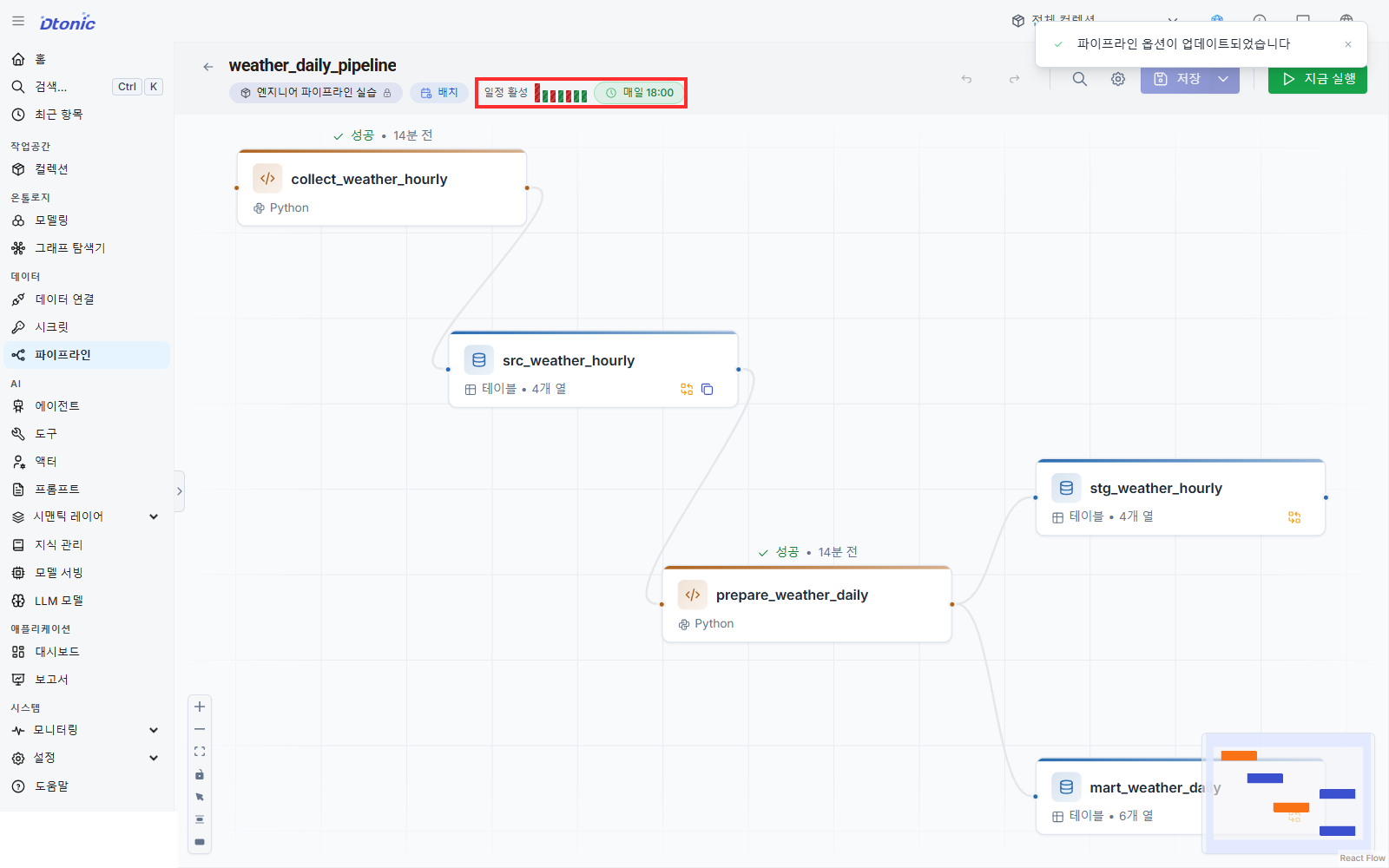
An automatic run begins only when its scheduled time arrives. To check the result immediately, use Run now. Starting one manual run does not remove the recurring schedule.
Run now and observe the state
- Select Run now.
- Confirm the button switches to Stop and the state shows as running.
- Watch the two code nodes change state in order on the canvas.
- When the run ends, confirm a new result appears in run history.
Colors in run history distinguish success, failure, and in-progress at a glance. Selecting a node and opening the History tab in the inspector shows that node's per-run state and duration.
Understand Stop
A running batch pipeline shows a Stop button. Selecting it requests that the current run stop.
Stop does not cancel everything immediately or roll back results already written. It halts at the boundary where the currently running group of steps finishes, so output from steps that finished earlier survives. If ingestion completes and the run stops before preparation, src_weather_hourly holds fresh data while mart_weather_daily still holds the previous values. Rerun the whole pipeline to bring them back in line.
Change or turn off the schedule
- To change the interval, pick a new value under Pipeline settings → Schedule and save.
- To turn off automatic runs, turn off Enable schedule and save.
- A pipeline without a schedule can still be started with Run now.
This screen has no email, Slack, or webhook notification settings and no escalation policy. If you need operational alerting, check what your organization uses separately.
Check yourself
- Did you open the Schedule tab on a saved batch pipeline?
- Did you confirm the run time in UTC?
- Does a schedule badge appear at the top after saving?
- Do you see why the ingest node's Overwrite write mode prevents duplication on daily runs?
- Does a new result appear in run history after Run now?
- Do you understand that Stop does not roll back completed steps?
Next lesson
The last lesson breaks the pipeline on purpose and traces the cause in history. After the fix and a full rerun, you put the mart on a dashboard chart and hand it to an analyst.
Before you finish
Use these questions to check whether you achieved this lesson's goal.
- Can you repeat ‘Run a batch pipeline on a schedule’ without following the instructions?
- Can you name at least one place to check when the result differs from what you expected?