Turn alerts into an inspection order
Compress six anomalies into machine health scores and use the operations dashboard to choose a first inspection among four HIGH machines.
Question for this chapter
When four machines are HIGH, which one should the crew inspect first?
Why this matters now
Anomaly rows explain events in detail, but the crew needs a machine-level action list. First summarize the alerts, then state the secondary evidence used to break a tie.
Try it
Open the equipment_health_rollup pipeline under processed and select Run. The calculation deducts
ten points per HIGH, four per MEDIUM, and one per LOW.
When the rollup finishes, open the equipment_health dashboard under processed.
What success looks like
equipment_health contains six rows, and the scores fall into two groups.
| Machine | Severity | Health score | Primary decision |
|---|---|---|---|
| CNC-03 | HIGH | 90.0 | Isolate and inspect |
| CNC-05 | HIGH | 90.0 | Isolate and inspect |
| CNC-07 | HIGH | 90.0 | Isolate and inspect |
| CNC-09 | HIGH | 90.0 | Isolate and inspect |
| CNC-01 | MEDIUM | 96.0 | Monitor |
| CNC-02 | LOW | 99.0 | Watch |
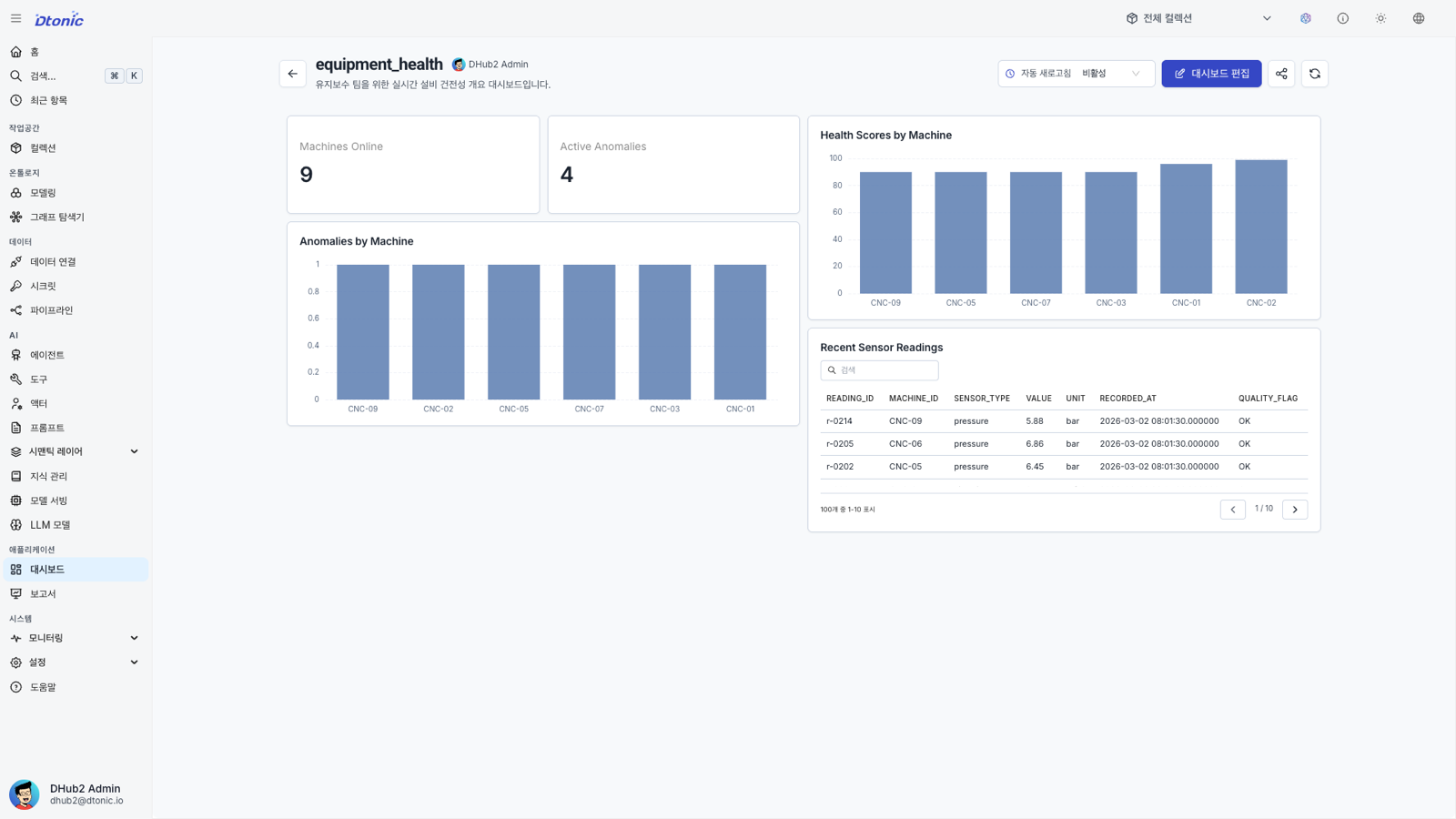
The dashboard's five widgets show the same result:
- Machines Online (statistic) — 9 machines with sensor data
- Active Anomalies (statistic) — 4
HIGHanomalies - Health Scores by Machine (bar) — 6 machines with rollup rows: four at 90, one at 96, one at 99
- Anomalies by Machine (bar) — one anomaly for each of the six machines
- Recent Sensor Readings (table) — 100 recent sensor rows, paged 10 at a time
Interpret the result
A single score carries the severity grade straight through. The four HIGH machines cluster at 90,
while the two caught by statistics alone separate out at 96 and 99. That split is where the inspection
list parts from the watch list.
The Primary decision column is a reading of those scores, not a value the Portal computed. Health
scores alone leave the four HIGH machines tied, so split the decision boundary explicitly:
- Operational safety: isolate and inspect CNC-03, CNC-05, CNC-07, and CNC-09. Leave CNC-01 and CNC-02 running and watch them until the next readings arrive.
- Workshop tie-break: if a starting point is needed, begin with CNC-03 because its vibration reading has the largest relative deviation among the tied alerts (z-score 6.89).
- Remaining order: continue with CNC-05 (4.92), CNC-09 (4.60), then CNC-07 (4.22).
Next decision
You selected CNC-03 as the first stop, but you still do not know who owns it, where it sits, or when it was handled — nor whether the four machines really form one queue. Next, connect technician, location, and shift to the machine, sensors, and maintenance event.