Start with the request from an operator who does not know the coordinates
Import the Map Control scenario and define the evidence needed to handle one natural-language display request.
Question for this chapter
What evidence is needed to handle “Show Busan Port Entry/Exit Control Zone”?
Why this matters now
Starting with an asset list makes it easy to run a pipeline without understanding the safety goal. First, fix the question and identify the role of a natural-language zone name, execution permission, map coordinates, and audit history in one request.
Try it
map_control.zip Download(44 KB)In the left sidebar, select Collections. On the Collections page, choose the upper-right more (⋯) menu → Import (가져오기) and upload the ZIP. If validation reports no conflicts, select Start import and wait for completion.
Success looks like this
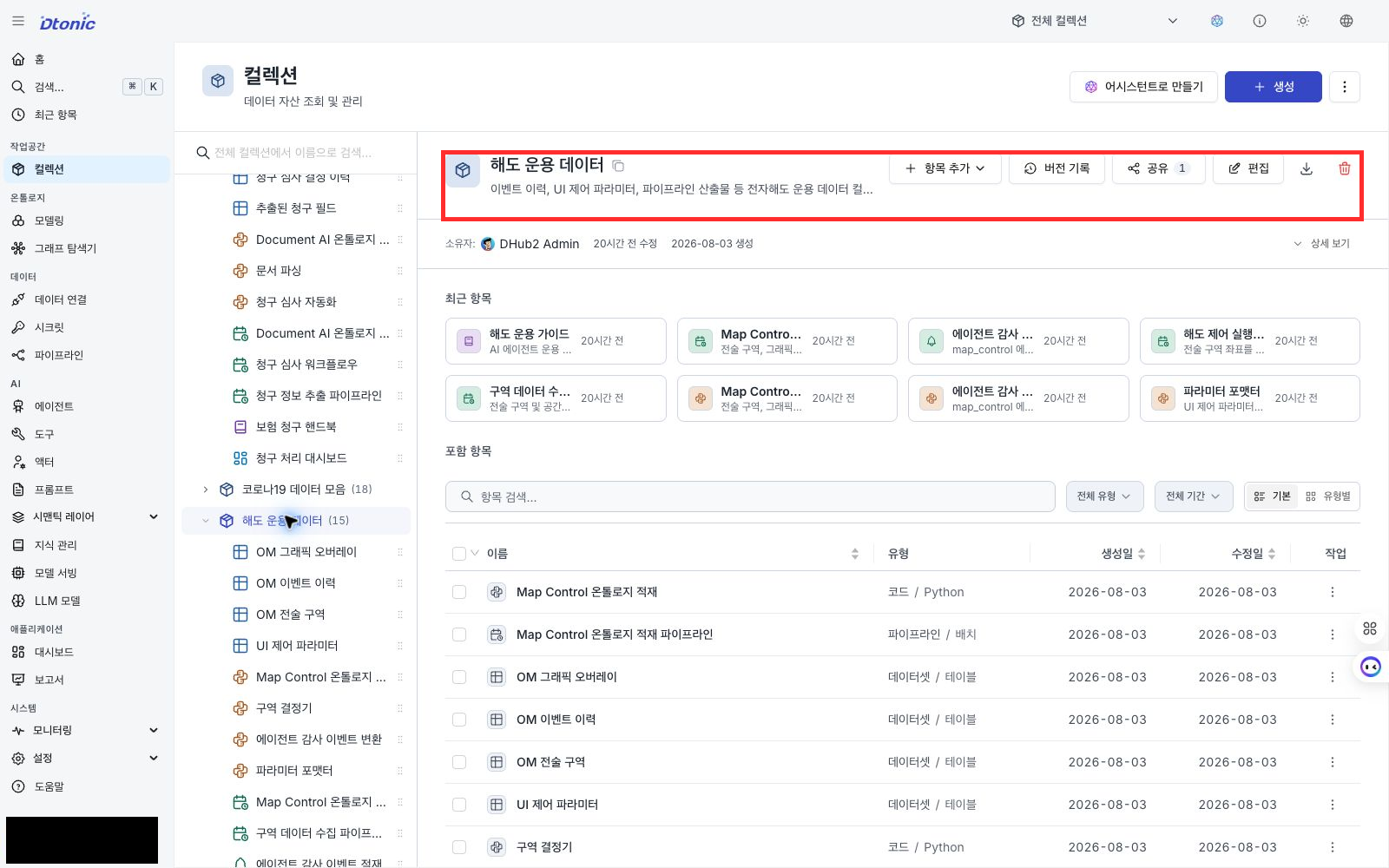
The collection tree shows tactical_data (Tactical Data) and map_ops (Chart Operations Data).
The current scenario registers its execution assets under map_ops.
Interpret the result
The request needs four kinds of evidence.
| Evidence | Question it answers | Asset to inspect |
|---|---|---|
| Zone definition | What zone did the operator name? | om_tactical_zone |
| Map representation | Where and at what scale should it appear? | om_graphic_overlay |
| Execution permission | May the Agent execute this request? | map-control Agent |
| Audit record | Who requested what, and what happened? | om_event_history |
A zone name alone cannot drive the chart. Coordinates alone do not explain the operational zone that was displayed. The Agent must connect the two while keeping permission and recording inside the same flow.
Deep dive — assets imported by the scenario
| Asset type | Count | Contents |
|---|---|---|
| Collections | 2 | tactical_data, map_ops |
| LLM model | 1 | claude_sonnet_4_6 |
| Datasets | 4 | zones, overlays, event history, UI-control parameters |
| Codes | 4 | zone resolution, parameter formatting, event conversion, ontology materialization |
| Pipelines | 4 | zone ingestion, chart-control batch, Agent events, ontology materialization |
| Ontology | 3 entities / 2 relations | zones, overlays, events, and spatial/event-reference relations |
| Knowledge / dashboard | 1 each | operation_guide, map_operations |
| Agent tools / actor | 2 tools / 1 actor | zone and coordinate lookup, audit-event publication |
| Agent | 1 | map-control |
The import also loads synthetic zone and overlay Parquet files into two datasets. Event history appears when you run the batch pipeline in the next chapter.
Next decision
You have separated the roles of the assets. Next, inspect how an operator-facing zone name connects to an ID and map coordinates across the eight seeded zones.